Events
Events are similar to activities in that they represent operational entities associated with a location, resources, and metrics. The key difference is that events have no duration. An event occurs at a single point in time rather than over an interval.
Typical examples include a delivery pickup, the activation of a pump, or a blast on a mining site.
This distinction has several practical implications. Events cannot use rate-based metrics, as their duration is always zero. Their status transitions directly from pending to completed or failed, without an intermediate in progress state. In the timeline view, events are displayed as icons and do not change width when zooming, since they represent a moment rather than a time span.
Creating events
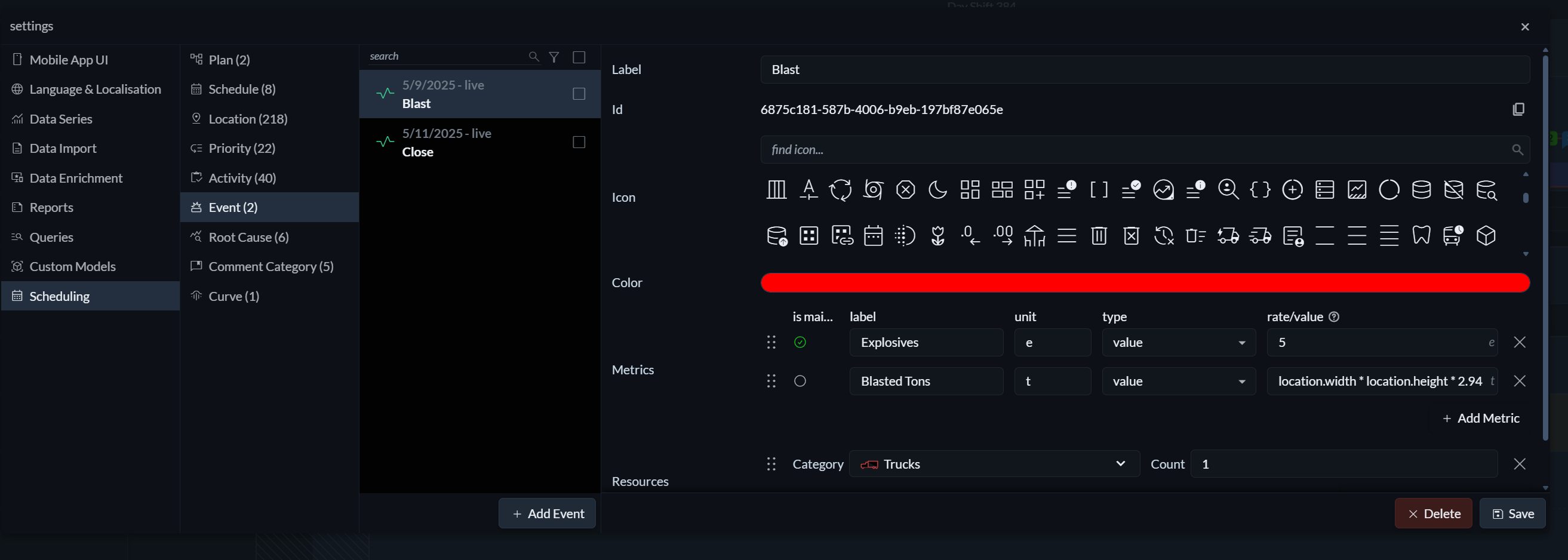
To create or edit events, open the Settings menu (the three horizontal lines on the right) and navigate to Scheduling → Events. Here, you define the event’s label and colour, select an icon for visualisation, and configure its metrics and resource requirements in the same way you would for an activity.
Scheduling events
 To place an event on the timeline, click on a track and select Add Event. The event is created at the selected point in time. From there, it can be moved, edited, and updated in the same way as a task, with the exception that it always represents a single instant rather than a duration.